Fulfilment by Amazon
Interactive walkthrough
Prefer to see it in action? Open the guided walkthrough, an animated, click-by-click tour you can play automatically or step through yourself.
Fulfilment by Amazon lets Amazon do your picking, packing and shipping for you, not just for your Amazon orders but for your Shopify orders too. Amazon calls this Multi-Channel Fulfilment, usually shortened to MCF. If you already hold stock in Amazon's warehouses under FBA, this feature puts that same stock and the same logistics network behind your own storefront.
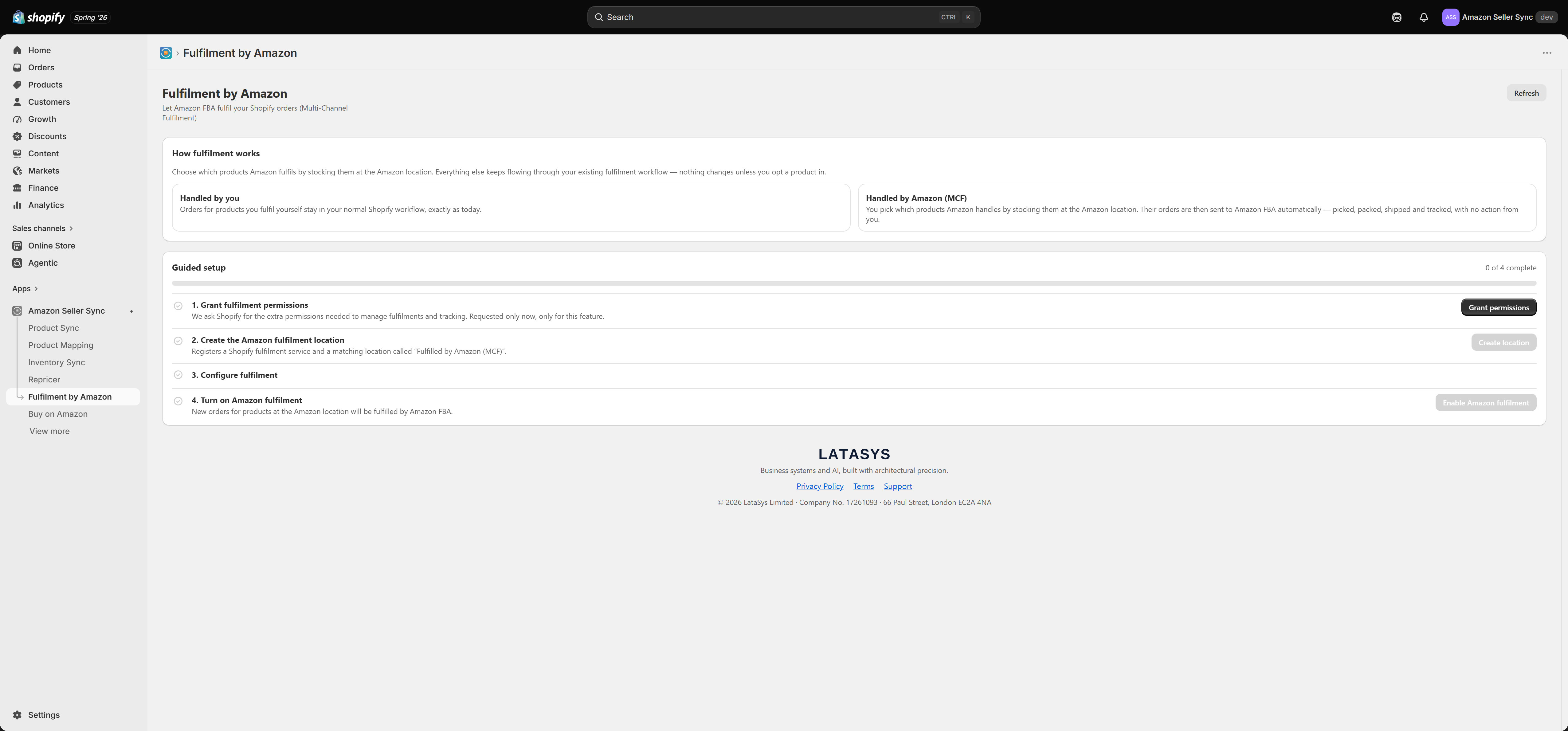
What MCF actually does
When a customer buys from your Shopify store, the order normally lands in your Shopify admin and waits for you to fulfil it. With MCF switched on, the app sends qualifying orders to Amazon instead. Amazon picks the item from your FBA inventory, packs it, ships it to your customer's address, and returns the carrier and tracking number, which the app writes back onto the Shopify order.
Your customer receives their parcel. You did not touch it. From Shopify's point of view the order is fulfilled with tracking, exactly as if you had shipped it yourself.
Note that this consumes your FBA stock, the units already sitting in Amazon's warehouses. MCF is not a way to get Amazon to ship goods you are holding in your own stockroom.
The two lanes
Once MCF is running, every order in your store falls into one of two lanes.
Handled by you. Orders for products you fulfil from your own locations carry on exactly as they do today. They appear in Shopify, you pick and pack them, you buy a label, you mark them fulfilled. Nothing about your existing workflow changes.
Handled by Amazon. Orders for products you have opted into MCF are routed to Amazon FBA automatically. You do not fulfil them, and you should not try to. Amazon ships them and the tracking flows back to Shopify on its own.
The whole feature turns on how a product ends up in the second lane. There is no per-product on and off switch anywhere in the app. You opt a product in by where you stock it in Shopify. This is the single most misunderstood part of the feature, so it has an article of its own: read Choosing what Amazon fulfils before you go live.
Why it needs extra Shopify permissions
Most of Amazon Seller Sync reads your products and writes prices and listings. MCF is different in kind: to hand an order to Amazon and then report back on it, the app has to be able to read your orders, create fulfilments against them, manage locations, and write inventory.
Those are meaningfully broader permissions, so the app does not ask for them at install. They are requested in the app, only when you set up this feature, and only for this feature. If you never use Fulfilment by Amazon, the app never holds them. You grant them in step 1 of the guided setup, described in Setting up Fulfilment by Amazon.
Multi-market routing
If you sell across more than one Amazon marketplace, you do not have to nominate a single one to fulfil everything. In the setup you choose which FBA marketplaces to fulfil from, and the app decides per order which one to use.
The routing logic is straightforward. For each order it looks at where the customer's parcel is going and picks the best marketplace for that destination: a marketplace in the same country first, and failing that one in the same region. So a customer in France is served from your French FBA stock if you have it, and from elsewhere in Europe if you do not.
Before sending anything, the app confirms with Amazon that the order can actually be fulfilled. It checks that Amazon can ship those items to that address from that marketplace. Only then does it hand the order over.
If no marketplace can fulfil the order, the app does not force it and does not silently fail. The order is simply left for you to handle in your normal workflow, and it is marked so you can see what happened. By default nothing is reassigned automatically, although you can turn on an option that reassigns unfulfillable orders to your own locations. That option is covered in the setup article.
Note
The confirmation step is what stops customers being promised an Amazon delivery that never arrives. It also means an order can pass through the routing check and still come back to you, for example if the FBA stock ran out between the sale and the check. That is the system working as designed.
Which plans include it
Fulfilment by Amazon is available on every plan, including Free. It is not gated behind an upgrade. Some features in the app are paid only, notably Product Sync, the Repricer, Inventory Sync, Analytics and AI content, but MCF is not one of them. See Plans and billing.
You do of course need an Amazon account connected, with FBA stock in it, and at least one connected marketplace.
Where to go next
- Setting up Fulfilment by Amazon, the four-step guided setup, including packaging, delivery speed and the stock sync options
- Choosing what Amazon fulfils, how a product opts in, and how to read MCF order statuses, tracking and returns
- Inventory Sync, a separate feature covering FBA visibility and FBM stock push
Related Articles
Setting up Fulfilment by Amazon
The Fulfilment by Amazon page walks you through a four-step Guided setup. Each step marks itself done as you complete it, so you can leave and come back without losing your place. This article covers each step and explains the settings that are easy ...Amazon Seller Sync
Interactive walkthrough Prefer to see it in action? Open the guided walkthrough, an animated, click-by-click tour you can play automatically or step through yourself. Amazon Seller Sync is an embedded Shopify app that joins your Shopify store to your ...Choosing what Amazon fulfils
This is the concept merchants miss most often, and almost every support question about Fulfilment by Amazon traces back to it. It is worth two minutes of your time. There is no per-product switch Look for a toggle labelled "fulfil this product with ...Connecting multiple Amazon accounts
Most merchants only ever need one Amazon account connected. Some need two or more. This page explains when a second account is the right answer, how to add one, and what your plan allows. Accounts are managed on the Amazon account tab of Settings. ...Amazon accounts, regions and marketplaces
Before you map a single product, it helps to understand how Amazon organises selling accounts. Amazon is not one global shop. It is a set of regional groups of marketplaces, and your Seller Central account belongs to exactly one of those groups. ...