Amazon Seller Sync
Interactive walkthrough
Prefer to see it in action? Open the guided walkthrough, an animated, click-by-click tour you can play automatically or step through yourself.
Amazon Seller Sync is an embedded Shopify app that joins your Shopify store to your Amazon Seller Central account and keeps the two in step. You install it from the Shopify App Store, authorise Amazon once, and then run everything from inside Shopify Admin. There is nothing to install on your computer.
Who it is for
The app is for Shopify merchants who also sell on Amazon, or who want to start. You do not need to be an Amazon expert, but you do need an Amazon Seller Central account in a supported region, because everything the app does runs through Amazon's official seller API (SP-API).
It fits you well if any of this sounds familiar.
- You maintain the same catalogue twice, once in Shopify and once in Seller Central.
- You want your Shopify product pages to show what the item costs on Amazon, or to send shoppers to Amazon deliberately.
- You hold stock in Amazon's warehouses under FBA (Fulfilment by Amazon) and would like Amazon to ship your Shopify orders too.
- You are losing the Buy Box and have no time to watch competitor prices by hand.
The app scales from a single seller who only wants live Amazon prices on their product pages, up to a multi-account, multi-marketplace operation publishing and repricing thousands of listings.
The four things the app gives you
Sell on Amazon, using your Shopify catalogue
Product Sync publishes Shopify products to Amazon as real listings. It builds the Amazon attributes from data you already have (title, brand, description, images, barcode, price and quantity), submits them to Amazon, and reads the ASIN (Amazon's product identifier) back into Shopify so price sync and the storefront blocks pick it up. See Product Sync.
Compete for the Buy Box
The Repricer watches the lowest offer on each of your listings and moves your Amazon price to compete for the Buy Box, which is the "Add to Basket" box that most Amazon sales flow through. It works only inside a price floor and a price ceiling that you set, and when you already hold the Buy Box it holds your price instead of lowering it. See Repricer.
Let Amazon fulfil your Shopify orders
Fulfilment by Amazon sets up Multi-Channel Fulfilment (MCF). Amazon picks, packs and ships orders placed on your own storefront, using stock you already hold in Amazon's warehouses, and tracking flows back into Shopify. This is available on every plan, including Free. See Fulfilment by Amazon.
Show Amazon prices and a Buy on Amazon button
Two theme app blocks put synced Amazon data on your storefront. The Amazon Price block shows the current Amazon price for the shopper's market, with an optional savings line. The Buy on Amazon button sends the shopper to your listing, with Amazon Attribution parameters attached if you want them.
How the app is organised
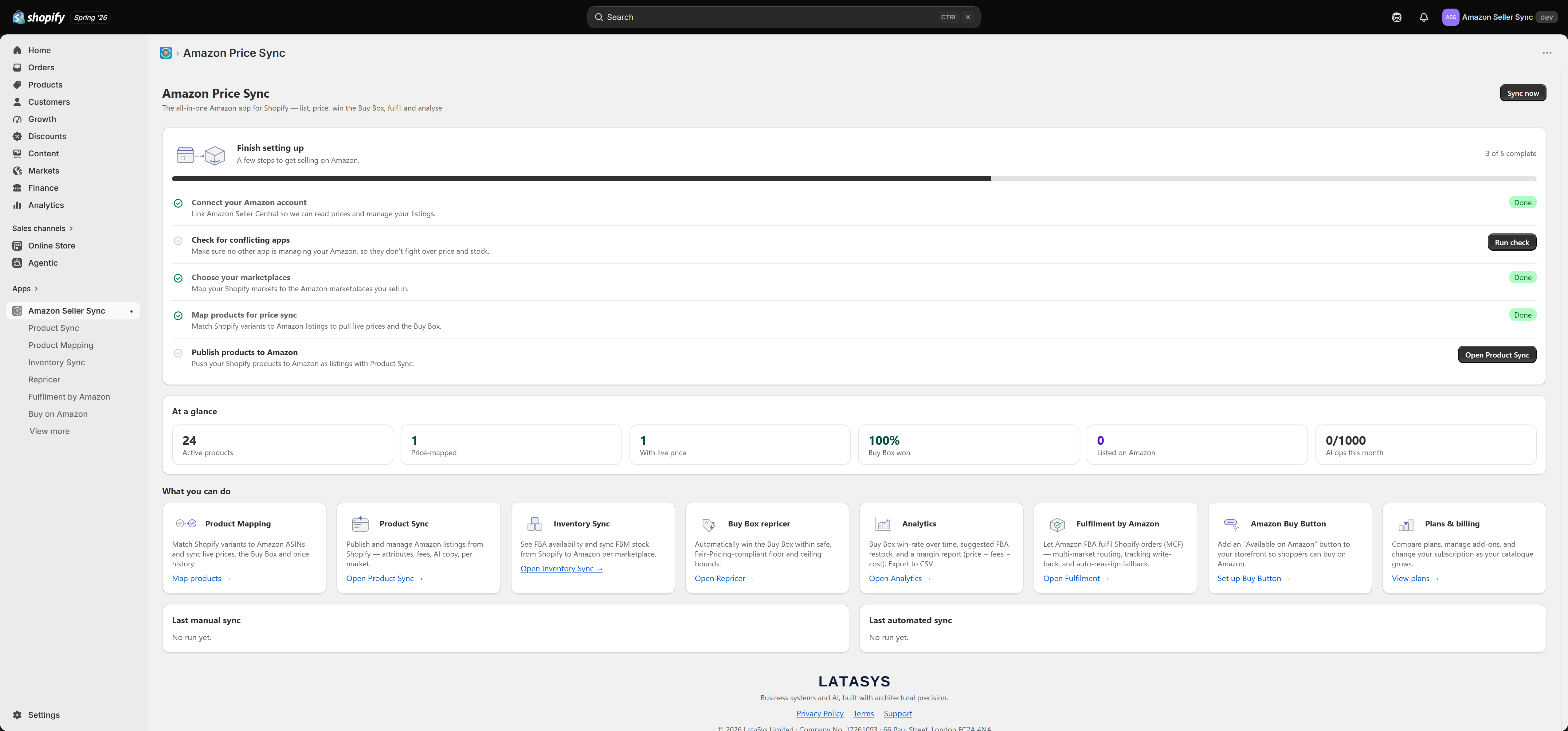
The app has eleven screens. Shopify's navigation shows the first seven; Fulfilment by Amazon and Buy on Amazon sit under "View more".
| Screen | What you do there |
|---|---|
| Dashboard | Headline stats, the setup guide, sync health, and Sync now |
| Product Sync | Publish Shopify products to Amazon as listings |
| Product detail | Attributes, AI tools, Amazon fees, issues, per-product repricer limits |
| Product Mapping | Link Shopify variants to Amazon ASINs so prices can sync |
| Inventory Sync | FBA availability (read-only) and FBM stock push |
| Repricer | Your Buy Box repricing rules and last-run summary |
| Fulfilment by Amazon | The MCF setup wizard and your FBA-fulfilled Shopify orders |
| Buy on Amazon | Storefront button links and attribution |
| Analytics | Four reports, each with CSV export |
| Plans | Plan cards, add-ons, usage and promo codes |
| Settings | Amazon account, Markets, AI, Automation and Metafields |
Where to start
- Install and choose a plan. On first open the entire app is replaced by the plan chooser, and nothing else works until you pick. Free is a valid choice. See Getting started and Plans and billing.
- Connect Amazon. Choose your region, authorise in Seller Central, and let the app discover your marketplaces. See Connecting Amazon Seller Central.
- Work through the setup checklist. Five steps on the Dashboard take you from a connected account to your first live listing. See Setup checklist and Check for conflicting apps.
If a price will not update, a listing will not publish, or the setup guide looks stuck, go straight to Troubleshooting.
Tip
Price and Buy Box sync, the Buy on Amazon button and Fulfilment by Amazon are included on every plan, including Free. Product Sync, the Repricer, Inventory Sync, Analytics and the AI content tools unlock on the paid plans.
Related Articles
Connecting Amazon Seller Central
Connecting your Amazon Seller Central account is the first step in the setup checklist, and it is the one thing every other feature depends on. Until an account is connected, price sync has nothing to read, Product Sync has nowhere to publish, and ...Price sync
Price sync is the heart of Amazon Seller Sync. For every variant you have linked to an ASIN on the Product Mapping page, the app asks Amazon what that product is currently selling for and whether you are winning the Buy Box, then writes the answers ...Product Sync
Product Sync takes the products that already exist in your Shopify store and publishes them to Amazon as real, live listings. You do not retype anything into Seller Central. Shopify stays the place where you write and maintain your product content, ...Supported Amazon marketplaces
Amazon Seller Sync supports 21 Amazon marketplaces across three regions. This page is the reference list. Which of these you can actually use depends on the marketplaces your Seller Central account is authorised for, and those are discovered when you ...Connecting multiple Amazon accounts
Most merchants only ever need one Amazon account connected. Some need two or more. This page explains when a second account is the right answer, how to add one, and what your plan allows. Accounts are managed on the Amazon account tab of Settings. ...