Buy Box repricer
The Repricer screen adjusts the prices of your Amazon listings on a schedule, with the goal of winning the Buy Box without ever pricing you into a loss. It is a paid feature, available on the Growth plan and above.
Interactive walkthrough
Prefer to see it in action? Open the guided walkthrough, an animated tour you can play or step through yourself.
What the Buy Box is and why it matters
On Amazon, many sellers can offer the same product against the same ASIN (Amazon's unique product identifier). The Buy Box is the panel on the product page containing the Add to Cart button, and only one seller occupies it at a time. Shoppers who click Add to Cart buy from whoever holds it. Most Amazon sales go through the Buy Box, so losing it means losing almost all of the sales on that listing, even though your offer is still visible further down the page.
Price is one of the strongest inputs into who wins the Buy Box. Amazon also weighs fulfilment method, delivery speed, seller metrics and stock, but price is the input you control directly from Shopify.
Why the repricer is bounded by design
Amazon's Marketplace Fair Pricing Policy works in both directions. Prices significantly higher than recent prices offered on or off Amazon can be treated as unfair, and the consequence is listing suppression: your offer loses Buy Box eligibility, or the listing stops showing at all. Prices below cost are also penalised.
So the repricer is bounded. It never prices outside the floor and ceiling you set, both anchored to your Shopify price, and it only lowers your price when you do not already hold the Buy Box. It cannot chase a competitor into a loss, and it cannot drift upward into suppression territory.
The settings
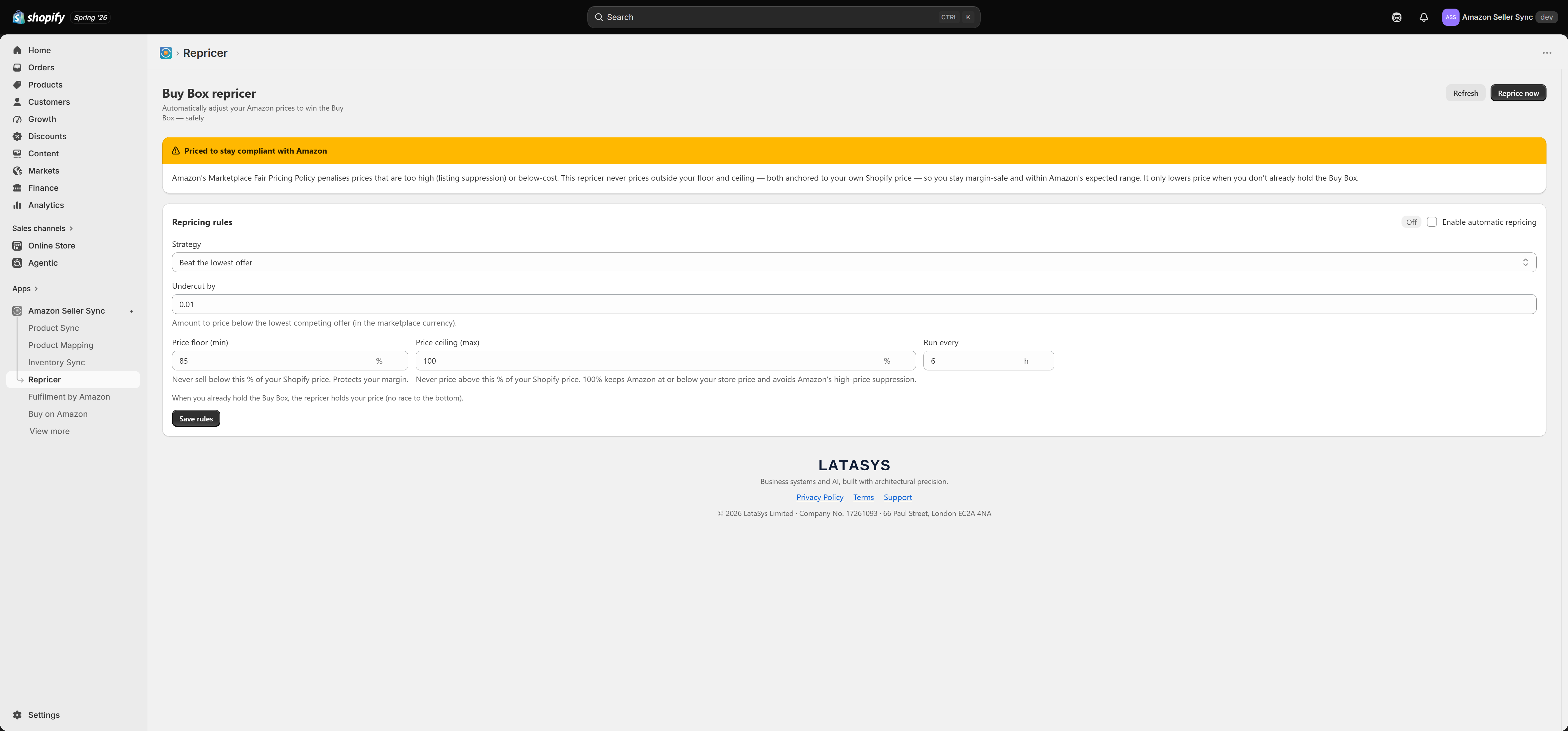
Enable automatic repricing. Off by default. The master switch for the scheduled run. It saves immediately on toggle, without needing Save rules.
Strategy. Either Beat the lowest offer or Match the lowest offer. Those are the only two. Beating puts your price slightly under the lowest competing offer. Matching sets it equal, which is often enough when your seller metrics are strong.
Undercut by. Used by the beat strategy only. An amount in the marketplace currency, defaulting to 0.01, subtracted from the lowest offer to produce your target price.
Price floor (min) %. The lowest price the repricer may set, as a percentage of the Shopify price. Default 85, clamped between 1 and 100.
Price ceiling (max) %. The highest price it may set, as a percentage of the Shopify price. Default 100, clamped between 1 and 200.
Run every (hours). How often the scheduled run happens. Default 6, clamped between 1 and 168.
Select Save rules to store these. Price floor and ceiling works through the band with real numbers.
The algorithm
For each eligible listing, the repricer does exactly this:
- Resolve the floor and ceiling. A per-product override is used if one is set, otherwise the percentages of the Shopify price. If neither resolves, the listing is skipped.
- Fetch the lowest New offer for that ASIN in that marketplace.
- If you already hold the Buy Box, the price is held. Nothing changes.
- Otherwise the target price is the lowest offer (match strategy), or the lowest offer minus Undercut by (beat strategy).
- The target is clamped to the floor and ceiling, then pushed to Amazon.
Step 3 is worth repeating loudly. If you already hold the Buy Box, the repricer holds your price and changes nothing. It does not shave a penny off to be safe, and it does not react to a competitor who is merely close behind you. This prevents the classic race to the bottom, in which two repricers undercut each other in turn until both sell at a loss.
Reprice now and the last-run summary
Reprice now runs the process immediately across your eligible listings, whether or not automatic repricing is enabled. It is the right way to test your rules before turning the schedule on. The scheduled run only happens if Enable automatic repricing is on and at least Run every hours have elapsed.
The last-run summary shows four counts:
- repriced: the price was changed on Amazon.
- held (winning): you already held the Buy Box, so the price was left alone.
- skipped: no floor and ceiling could be resolved, or no offer data came back.
- hit the floor: the target came out below your floor, so the floor was used instead. A high count means competitors sit underneath your floor and you are choosing not to follow them down.
Only published products are repriced
The repricer only touches products you have published to Amazon through Product Sync, because only those have a listing you own and can write a price to.
A product linked to an ASIN on the Product Mapping page is not a listing of yours. Mapping pulls Amazon's price and Buy Box status into Shopify for reference; it does not create anything on Amazon for you to reprice. Products mapped that way are never repriced. If a product is not being repriced, check that it is Listed on the Product Sync page.
About the "lowest offer"
The lowest offer the repricer compares against is the lowest New offer on the ASIN overall. It is not filtered by seller, condition or fulfilment type, and the set includes your own offer. The comparison price may therefore belong to a seller you would never realistically compete with.
Your Price floor (min) % is the real safety net here, not the quality of that comparison. Set it deliberately, at a level you are genuinely happy to sell at, rather than accepting the default.
Related
- Price floor and ceiling
- Per-product price overrides
- Product Sync
- Analytics, for your Buy Box win rate over time
Related Articles
Buy Box performance
The Buy Box is the "Add to basket" position on an Amazon product page. When several sellers offer the same product, Amazon awards that button to one of them, and the overwhelming majority of sales on that listing go to whoever holds it. If you do not ...Buy on Amazon button
The Buy on Amazon button is a theme app block that puts an Amazon branded button on your Shopify product page. A shopper who clicks it lands on your Amazon listing for that product, in the marketplace that matches the market they are shopping from. ...Buy button links and attribution
The Buy on Amazon screen in the app decides two things: where each Buy on Amazon button sends the shopper, and whether Amazon can credit you for the click. The look of the button is set in your theme instead. See Buy on Amazon button. Most stores ...Amazon Seller Sync
Interactive walkthrough Prefer to see it in action? Open the guided walkthrough, an animated, click-by-click tour you can play automatically or step through yourself. Amazon Seller Sync is an embedded Shopify app that joins your Shopify store to your ...Per-product price overrides
The Buy Box repricer uses one store-wide floor and ceiling, expressed as percentages of your Shopify price. That works well for a catalogue with roughly consistent margins. It works badly for the products that are exceptions. A per-product override ...