Product Sync
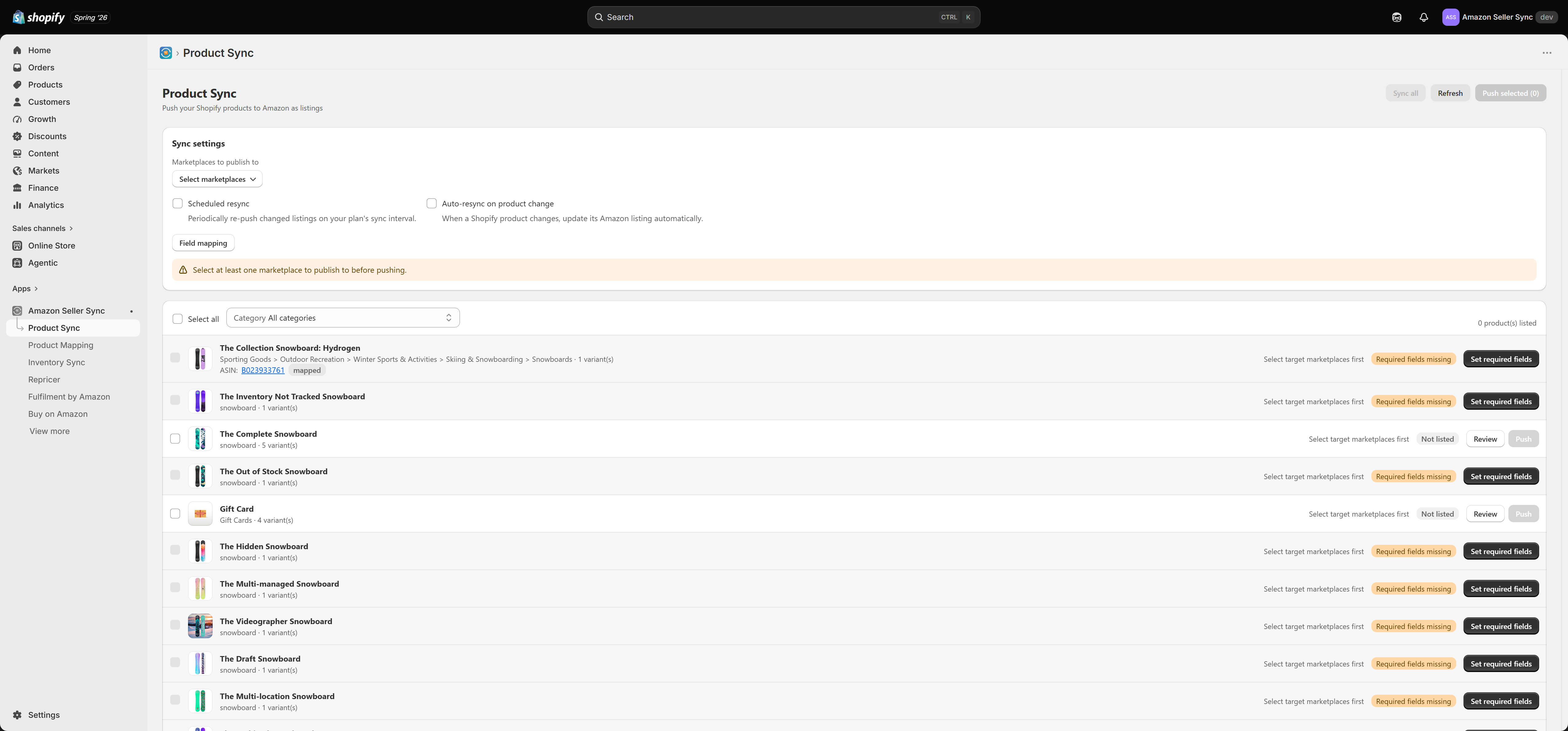
Product Sync takes the products that already exist in your Shopify store and publishes them to Amazon as real, live listings. You do not retype anything into Seller Central. Shopify stays the place where you write and maintain your product content, and the app carries that content across to each Amazon marketplace you sell in.
Interactive walkthrough
Prefer to see it in action? Open the guided walkthrough, an animated, click-by-click tour you can play automatically or step through yourself.
Product Sync is a paid feature, included on Growth and above. On the Free plan you can still map products for price sync, but you cannot publish new listings. See Plans and billing.
Note
Product Sync runs in the opposite direction to Product Mapping. Product Mapping links a Shopify variant to a listing that already exists on Amazon so prices can be pulled back into Shopify. Product Sync creates the Amazon listing in the first place.
Before anything will push
Three things must be in place. If any one of them is missing, nothing leaves your store. This is by far the most common reason a merchant clicks Push selected and sees nothing happen.
- Select your target marketplaces. In the Sync settings card, choose Marketplaces to publish to. If you skip this, the app stops you with "Select at least one marketplace to publish to before pushing."
- Set an Amazon product type for the product's category. Amazon will not accept a listing without a product type, and the type is set per marketplace. Until it is mapped, the product carries the Needs type badge and is held back. See Amazon product types.
- Fill in the required Shopify fields. A product needs a Brand (vendor) and a Description in Shopify before it can even be ticked in the list. See Required Shopify fields.
Tip
Work through those three in order the first time. Once your marketplaces are chosen and your main categories have a product type mapped, publishing a new product becomes a two-click job.
The product list
The main table lists your Shopify products alongside their current Amazon state. Use the filters and the search box to narrow it down, then tick the products you want to act on. Products that fail the required-fields check cannot be ticked at all, which saves you from pushing something Amazon would only reject.
Listing status badges
| Badge | What it means |
|---|---|
| Listed | The listing is live on Amazon. |
| Submitted | The push went through and Amazon is still processing it. This usually clears within minutes, occasionally longer. |
| Needs type | No Amazon product type is mapped for this product's Shopify category. Nothing will push until you set one. |
| Issues | Amazon accepted the submission but has raised errors or warnings against it. Open the product to read them. See Listing issues. |
| Closed | The listing still exists on Amazon but its inventory is set to 0, so nobody can buy it. |
| Not listed | The product has never been published. |
Two sync-state badges can appear alongside these. Syncing means a push is in flight right now. Mapped (price only) means the product is linked to an Amazon ASIN (Amazon's unique product identifier) for price sync, but the app is not managing the listing itself.
Pushing products
- Push selected publishes only the products you have ticked. This is the control you will use day to day.
- Sync all pushes every eligible product in one run. Use it for your initial launch, or after you change your field mapping and want that change to reach every listing.
- Refresh re-reads the current state from Amazon. Use it a few minutes after a push to see whether Submitted has turned into Listed or Issues.
A push sends your product content, your price and your stock quantity for every selected marketplace. Amazon then either creates a new catalogue entry or matches your product to an existing one and gives you an offer on it.
Sync settings
The Sync settings card controls how and when publishing happens.
Marketplaces to publish to
The set of Amazon marketplaces that every push targets. Only marketplaces your connected Amazon account is authorised for will appear here. Adding a marketplace later does not retroactively publish your back catalogue, so run Sync all once after you add one.
Scheduled resync
Available on Growth and above. The app re-pushes the listings it already manages on a schedule, so edits you make in Shopify reach Amazon without you having to remember to click anything. A resync only touches products the app is already tracking. It never publishes something new on its own.
Auto-resync on product change
Available on Growth + Markets and Full only. Rather than waiting for the schedule, the app listens for Shopify's product-update signal and re-pushes that product within moments of you saving it. Like scheduled resync, it applies only to products Product Sync already tracks.
Warning
If another Amazon app is also creating or editing listings for the same products, the two apps will overwrite each other and your content, price and stock will flap back and forth. Run the conflicting-apps check from the Dashboard and turn listing management off in the other app before you publish.
Plan limits
Your plan sets how many products the app can keep synced. If you go over that limit, for example after a downgrade, the app keeps your most recently updated listings active and pauses the rest. Nothing is deleted on Amazon. See Managing your plan.
Where to go next
- Amazon product types explains the category mapping that clears Needs type.
- Required Shopify fields covers the Brand and Description gate.
- Field mapping shows what feeds each Amazon attribute and how to change it.
- Variations explains how Shopify variants become Amazon parent and child listings.
- Reviewing a product walks through the product detail page, the fees card and the issues card.
Related Articles
Product Mapping
Product Mapping is where you tell Amazon Seller Sync which Amazon product each of your Shopify variants corresponds to. Once a variant is linked to an ASIN (Amazon's unique product identifier, a ten character code such as B08N5WRWNW), the app can ...Price sync
Price sync is the heart of Amazon Seller Sync. For every variant you have linked to an ASIN on the Product Mapping page, the app asks Amazon what that product is currently selling for and whether you are winning the Buy Box, then writes the answers ...Inventory Sync
Interactive walkthrough Prefer to see it in action? Open the guided walkthrough, an animated, click-by-click tour you can play automatically or step through yourself. Inventory Sync is the screen that keeps your Amazon stock levels and your Shopify ...Amazon product types
If you have pushed products and nothing appeared on Amazon, this is almost certainly why. Amazon requires a product type on every listing, and the app will not guess one for you. A product type is Amazon's way of saying what kind of thing you are ...Per-product price overrides
The Buy Box repricer uses one store-wide floor and ceiling, expressed as percentages of your Shopify price. That works well for a catalogue with roughly consistent margins. It works badly for the products that are exceptions. A per-product override ...