Managing your plan
You can change plan at any time from the Plans page. Upgrades are simple and take effect immediately. Downgrades take a little more care, because your existing setup may be bigger than the plan you are moving to. This page explains exactly what the app does in each case.
The short version, and the thing most merchants want to hear first: nothing is ever deleted on Amazon. Your listings stay live, your ASINs stay yours, and your Seller Central account is untouched no matter what you do here.
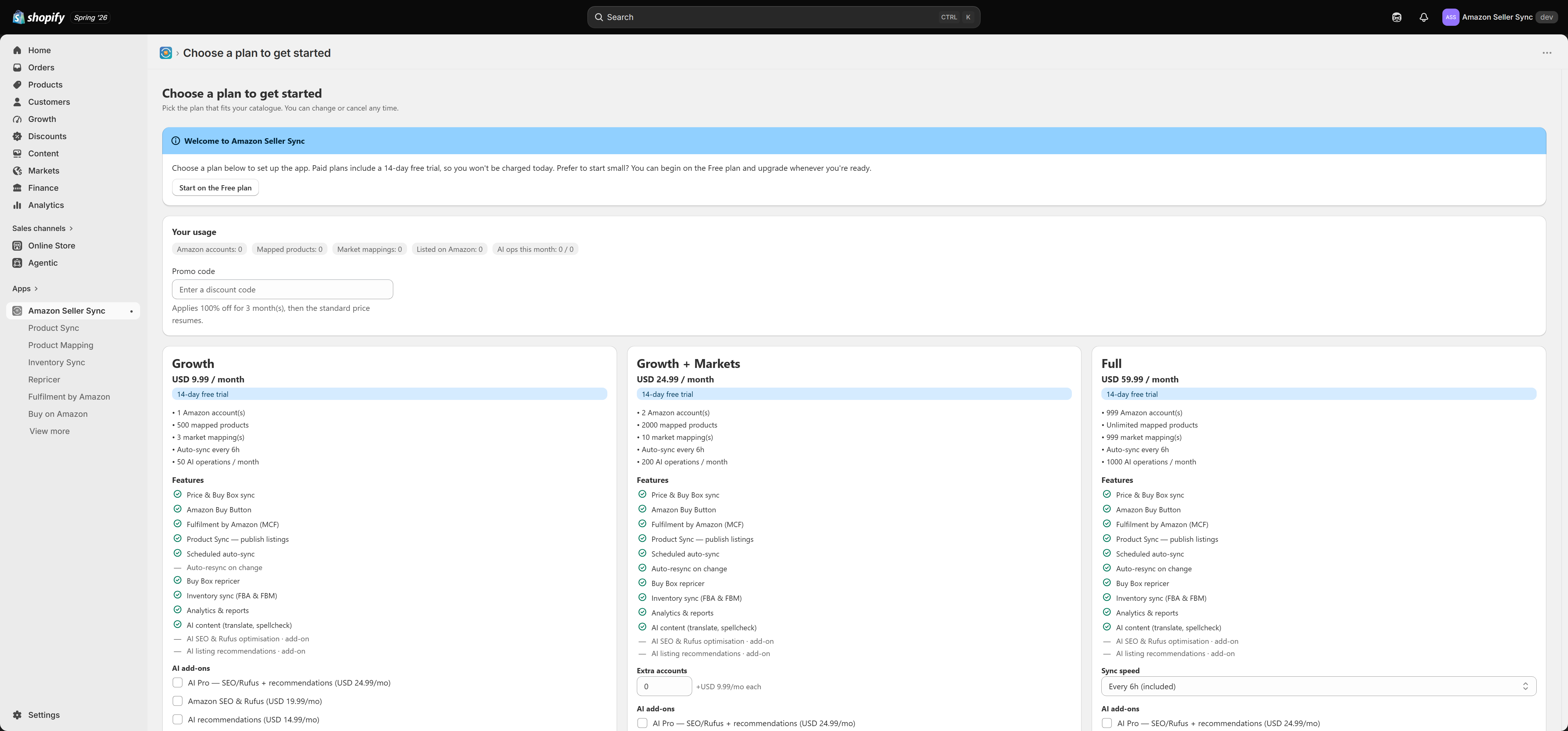
Upgrading
Pick the higher plan on the Plans page and approve the charge in Shopify. The upgrade is immediate. Your new caps apply straight away, and the features the new plan unlocks appear in the navigation as soon as the app reloads.
Nothing about your existing setup changes. Your mappings, listings, repricer rules and market mappings all carry over exactly as they were. A bigger plan only ever raises limits, so there is nothing to reconcile.
If you are on a 14-day free trial and you upgrade within it, you are simply moved onto the higher plan. Check the Plans page for how the trial applies.
Downgrading and the reconciliation flow
Moving to a smaller plan is the interesting case. Your current setup may exceed the new plan's caps: two Amazon accounts on a plan that allows one, ten market mappings on a plan that allows three, or more listings than the new plan permits.
The app does not guess which of those to drop, and it does not silently discard anything. Instead, the next time you open the app after the downgrade, an un-dismissable modal appears:
Your plan changed, let's fit your setup to it
You cannot close it or click past it, because the app needs a decision from you before it can carry on. This is deliberate. The alternative would be the app quietly choosing which of your Amazon accounts to cut, and that is not a choice it should make on your behalf.
What the modal asks you
Which Amazon accounts to keep. If you have more accounts connected than the new plan allows, you pick the ones to keep. The others are disconnected from the app. Disconnecting removes the app's access to that Seller Central account. The account itself, its listings and its inventory are completely unaffected.
Which markets to keep. If you have more market mappings than the new plan allows, you pick which ones survive. The rest are removed from Settings > Markets. This changes which Amazon marketplace each Shopify market takes its price from, and nothing more.
What happens automatically
Overflow listings are paused, not deleted. If you have more products listed on Amazon than the new plan allows, the app keeps the ones that fit and pauses the rest. A paused listing stays live on Amazon. It keeps selling. Its ASIN, its images and its price are all still there. What stops is the app updating it: no scheduled resync, no repricing, no inventory push. If you upgrade again later, those listings resume.
Product Sync is auto-paused if your new plan does not include it. Moving from any paid plan down to Free removes the Product Sync entitlement, so the app pauses Product Sync entirely. Again, your listings stay live on Amazon. They are just no longer managed from Shopify.
Mapped products over the cap keep working. Existing price-sync mappings continue to sync. You simply cannot add new mappings until you are back under the new plan's limit.
Once your choices fit the new plan, the modal clears and the app returns to normal.
Warning
Downgrading pauses updates. It does not close, delete or suppress anything on Amazon. If you actually want a listing gone from Amazon, use Close listing or Delete listing on the product detail page before you downgrade. See Product Sync.
Cancelling
Cancelling means moving to the Free plan. There is no separate cancel button that leaves you with nothing, because Free is a working plan rather than a dead end.
Choosing Free from the Plans page ends your paid subscription and runs the same reconciliation flow described above. If you are inside your 14-day free trial, you are not billed at all.
If you want to remove the app entirely, uninstall it from your Shopify admin. Uninstalling wipes the app's data for your shop. Before you uninstall, consider clearing the metafields the app wrote into your store, from Settings > Metafields using Remove definitions + data.
What the Free plan still gives you
Downgrading to Free is not the same as switching everything off. Free keeps:
- Price and Buy Box sync on your default (home) marketplace, running every 24 hours, plus unlimited manual Sync now runs from the Dashboard
- Product Mapping, including auto-match, up to 10 mapped products
- The Buy on Amazon button and the Amazon Price block on your storefront
- Fulfilment by Amazon (MCF), which is not plan-gated on any tier
What Free does not have is Product Sync, the Repricer, Inventory Sync, Analytics, AI content, and any per-market overrides beyond your single home marketplace.
For many merchants Free is a perfectly reasonable resting state: your Amazon prices still land in Shopify, your Buy Box status is still tracked, and your storefront still points shoppers at Amazon.
Where to go next
- Plans and billing for the full comparison and limits
- Usage and limits for what each cap does day to day
- Add-ons for raising a single limit without changing plan
Related Articles
Plans and billing
Interactive walkthrough Prefer to see it in action? Open the guided walkthrough, an animated, click-by-click tour you can play automatically or step through yourself. The Plans page is where you choose how much of Amazon Seller Sync you want to use. ...Usage and limits
Every plan carries a small number of hard caps. The app never bills you for going over one and it never silently drops your data. Instead it stops the action that would exceed the cap and tells you why. The Your usage card on the Plans page is where ...Getting started
This page is the whole first-run journey in one place: install the app, choose a plan, then complete the five step setup checklist that takes you from an empty screen to live Amazon listings. Each step has a detailed article of its own, linked below. ...Product Sync
Product Sync takes the products that already exist in your Shopify store and publishes them to Amazon as real, live listings. You do not retype anything into Seller Central. Shopify stays the place where you write and maintain your product content, ...Frequently asked questions
Do I need an Amazon Seller Central account? Yes. The app is a bridge between your Shopify store and your Amazon selling account, so you need the Amazon side to exist first. It does not create one for you and it cannot sell on Amazon on your behalf. ...