Plans and billing
Interactive walkthrough
Prefer to see it in action? Open the guided walkthrough, an animated, click-by-click tour you can play automatically or step through yourself.
The Plans page is where you choose how much of Amazon Seller Sync you want to use. It shows the four plan cards, the add-ons, a Your usage card, and a promo code field. You can open it from the app navigation at any time.
Billing runs through Shopify. You approve the charge in your Shopify admin and it appears on your normal Shopify invoice. Add-ons are billed as part of the same single monthly subscription line, not as separate charges.
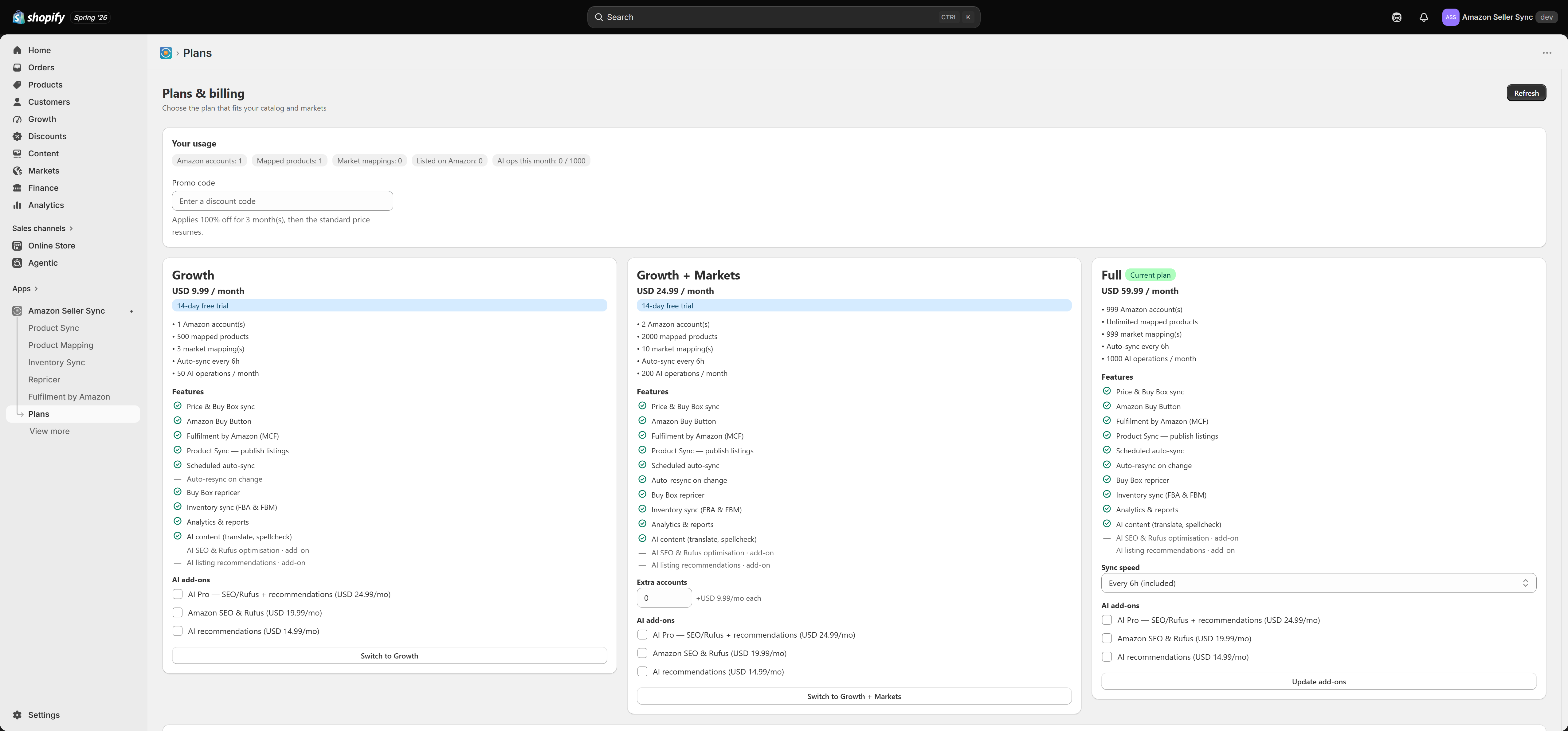
The first thing you see
On first open, if you have not yet chosen a plan, the entire app is replaced by the plan chooser. Nothing else works until you pick one. Free is a genuine choice here, not a trap. You can select Free, connect Amazon, and have prices syncing into Shopify the same afternoon.
What is free forever
Three capabilities are on every plan, including Free, and they stay on Free indefinitely:
- Price and Buy Box sync. Amazon prices and Buy Box status are pulled into Shopify and written to your product metafields. See Price sync.
- The Amazon Buy Button. Both storefront theme blocks (the Buy on Amazon button and the Amazon Price block) work on Free. See Buy on Amazon button.
- Fulfilment by Amazon (MCF). Letting Amazon FBA fulfil your Shopify orders is not plan-gated at all. See Fulfilment by Amazon.
What needs a paid plan
Five features require Growth or above:
- Product Sync, which publishes Shopify products to Amazon as real listings
- The Repricer, which competes for the Buy Box
- Inventory Sync, which pushes your Shopify stock to Amazon for merchant-fulfilled SKUs
- Analytics, the four reports plus CSV export
- AI content, the AI tools on the product detail page
Feature comparison
| Feature | Free | Growth | Growth + Markets | Full |
|---|---|---|---|---|
| Price and Buy Box sync | Yes | Yes | Yes | Yes |
| Product Mapping and auto-match | Yes | Yes | Yes | Yes |
| Buy on Amazon button and Amazon Price block | Yes | Yes | Yes | Yes |
| Fulfilment by Amazon (MCF) | Yes | Yes | Yes | Yes |
| Product Sync (publish listings) | No | Yes | Yes | Yes |
| Scheduled resync of listings | No | Yes | Yes | Yes |
| Auto-resync on product change | No | No | Yes | Yes |
| Buy Box repricer | No | Yes | Yes | Yes |
| Inventory Sync | No | Yes | Yes | Yes |
| Analytics and CSV export | No | Yes | Yes | Yes |
| AI content (Translate, Spell-check) | No | Yes | Yes | Yes |
| Amazon SEO & Rufus | No | Add-on | Add-on | Add-on |
| AI recommendations | No | Add-on | Add-on | Add-on |
| Extra Amazon accounts | No | No | Add-on | No |
| Faster sync speed | No | No | No | Add-on |
The limits
Each plan also carries a set of caps. These are the numbers the app actually enforces.
| Limit | Free | Growth | Growth + Markets | Full |
|---|---|---|---|---|
| Amazon accounts | 1 | 1 | 2 | 999 |
| Mapped products | 10 | 500 | 2,000 | Unlimited |
| Market mappings | 0 | 3 | 10 | 999 |
| Sync interval | 24h | 6h | 6h | 6h |
| AI operations per month | 0 | 50 | 200 | 1,000 |
Two rows in that table are easy to misread, so they are worth spelling out.
Sync frequency does not scale with plan. Growth, Growth + Markets and Full all run the automated sync every 6 hours. Only Full can buy the Sync speed add-on to move to a 3h, 2h or 1h cadence. If you have seen an older version of these docs claiming that a higher paid tier syncs more often on its own, that claim was wrong. Whatever your plan, Sync now on the Dashboard runs immediately and does not wait for the interval.
Free gets zero market mappings. Every plan, Free included, can set a default (home) marketplace. What Free cannot do is add per-market overrides on top of it, so a Free shop syncs prices from one Amazon marketplace only. Market mappings explains what an override buys you.
The 14-day free trial
Every paid plan includes a 14-day free trial. The trial starts when you approve the subscription, and you are not charged during it. You get the complete feature set of the plan you picked, so a trial of Full is a real trial of Full rather than a limited preview.
If you move back to Free before the trial ends, you are not billed. Read Managing your plan first, because moving down triggers the reconciliation flow.
Promo codes
The Plans page has a Promo code field. Enter your code before choosing a plan and it is applied to the plan you select. If a code is rejected, check that it has not expired and that it applies to the tier you are choosing.
About the prices
Plan prices are shown live on the Plans page in your own currency, and they are configurable, so the Plans page is the figure to trust rather than anything quoted here. In shape: Free costs nothing, Growth is the entry paid tier, Growth + Markets sits in the middle and buys multi-market and multi-account headroom, and Full removes almost every cap.
Where to go next
- Add-ons covers extra accounts, faster sync, and the AI packs.
- Usage and limits covers what actually happens when you hit a cap.
- Managing your plan covers upgrading, downgrading, and cancelling.
Related Articles
Managing your plan
You can change plan at any time from the Plans page. Upgrades are simple and take effect immediately. Downgrades take a little more care, because your existing setup may be bigger than the plan you are moving to. This page explains exactly what the ...Getting started
This page is the whole first-run journey in one place: install the app, choose a plan, then complete the five step setup checklist that takes you from an empty screen to live Amazon listings. Each step has a detailed article of its own, linked below. ...Add-ons
Add-ons let you buy a single capability without jumping to a whole new plan. They sit under the plan cards on the Plans page, and they are billed as part of the same monthly subscription line rather than as separate charges. Turning one on or off ...The AI allowance and your own key
There are two ways to power the AI tools in Amazon Seller Sync. You can use the built-in engine, which needs no setup and draws on a monthly allowance included with your plan. Or you can add your own API key, which bypasses the allowance completely ...Amazon Seller Sync
Interactive walkthrough Prefer to see it in action? Open the guided walkthrough, an animated, click-by-click tour you can play automatically or step through yourself. Amazon Seller Sync is an embedded Shopify app that joins your Shopify store to your ...